Introduction to Cloud Utility Tools
Cloud computing has changed how individuals and businesses store information, run applications and manage digital operations. As cloud environments become more sophisticated, managing resources manually can quickly become complicated and time-consuming. Cloud utility tools provide practical solutions for monitoring, organising, securing and optimising cloud environments, helping users maintain better control while reducing unnecessary administrative effort and improving overall productivity.
Modern organisations often depend on multiple cloud services for everyday operations, from data storage and application hosting to databases and online collaboration. Without suitable management solutions, identifying performance issues or unnecessary resource usage can be difficult. Cloud utility tools simplify these processes by providing useful insights, automation capabilities and management features that help users work with cloud resources more efficiently.
What Are Cloud Utility Tools?
Cloud utility tools are software applications and online services created to help users perform specific cloud-related tasks. These tasks can include monitoring system performance, managing storage, analysing costs, transferring data, creating backups, checking security activity and troubleshooting technical problems. Some utilities are designed for beginners, while others provide advanced functionality for developers, cloud engineers and IT administrators.
The main purpose of these tools is to make cloud management more convenient and organised. Instead of manually checking different services or performing repetitive administrative activities, users can rely on specialised utilities to streamline their workflows. Depending on their design, they may provide dashboards, reports, automated processes, alerts and integrations that make complicated cloud operations easier to understand.
Why Cloud Utility Tools Matter for Modern Cloud Management
Managing a cloud environment involves more than simply storing files or running an application. Businesses need to monitor resource consumption, maintain performance, control expenses and protect important information. Cloud utility tools can bring these responsibilities into a more manageable workflow, giving administrators greater visibility into their infrastructure and helping them respond to potential problems before they affect users or business operations.
Efficiency is another reason these solutions are increasingly important. Repetitive tasks can consume valuable working hours when they are handled manually, particularly within larger environments. Automation and monitoring features can reduce this burden while providing consistent information about cloud resources. As organisations expand their digital infrastructure, having practical management tools can make everyday cloud administration more organised, predictable and efficient.
Common Types of Cloud Utility Tools
Cloud environments require different types of management solutions because every resource has different requirements. Monitoring tools can track performance, availability and resource consumption, while storage utilities can help users organise, transfer and manage cloud-based files. Backup solutions provide additional protection by maintaining copies of important information, helping organisations prepare for accidental deletion, technical failures or other unexpected events.
Other categories include cloud security utilities, cost management platforms, database management tools and migration solutions. Developers may also use command-line utilities and deployment tools to manage applications more efficiently. Logging and diagnostic solutions are valuable for investigating errors and unusual behaviour. Understanding these categories helps users identify which type of utility best matches their technical requirements and operational objectives.
Key Features to Look for in Cloud Utility Tools
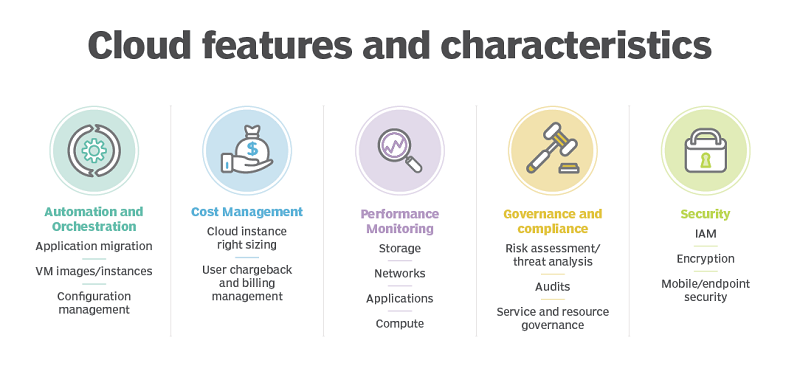
A useful cloud management solution should provide features that directly support the user’s objectives. An intuitive interface can make complex information easier to understand, while dashboards can provide a quick overview of resources and system activity. Real-time monitoring, automated alerts, reporting and scheduling can further improve efficiency by allowing users to identify changes and respond without constantly checking individual services.
Compatibility is equally important when evaluating a utility. The solution should work effectively with the cloud platforms, applications and services already being used. Security controls, access management, integrations and scalability should also be considered before making a decision. A tool that works well today but cannot support future requirements may eventually create additional costs and migration work for the organisation.
Benefits of Using Cloud Utility Tools
One of the most valuable advantages of cloud utility tools is their ability to improve productivity. Cloud administrators often perform repetitive activities such as checking resource consumption, reviewing logs and monitoring system performance. Suitable utilities can simplify these processes, allowing technical teams to dedicate more time to strategic projects, application improvements and other activities that contribute directly to organisational goals.
Better visibility is another significant benefit. When users can clearly understand how cloud resources are performing, they can identify potential problems more quickly and make informed decisions. Monitoring information can also support capacity planning, cost management and operational improvements. For growing organisations, this combination of automation and visibility can make increasingly complex cloud environments easier to manage without adding unnecessary administrative pressure.
How Cloud Utility Tools Improve Cloud Cost Management
Cloud spending can become difficult to control when organisations use numerous computing, storage and application services. Resources that are rarely used may continue generating expenses, while inefficient configurations can increase monthly bills. Cloud utility tools can help users examine usage patterns, identify potentially unnecessary resources and understand where cloud expenditure is being generated across different services.
Effective cost management does not simply mean removing resources to reduce spending. Organisations must consider performance, availability and business requirements before making changes. Cost analysis utilities can provide useful information that supports better decisions, including spending reports, usage trends and alerts. With regular monitoring, businesses can develop a clearer understanding of their cloud expenditure and identify opportunities for responsible optimisation.
Cloud Utility Tools for Security and Compliance
Security should be considered whenever cloud infrastructure is managed or monitored. Certain utilities can help organisations review access activity, monitor permissions, analyse logs and receive alerts about unusual behaviour. These capabilities can provide additional visibility into cloud environments and help technical teams investigate potential issues more efficiently, particularly when many users and services interact with shared infrastructure.
However, a management utility should not be treated as a complete security strategy. Organisations still need strong authentication, carefully managed permissions, encryption, secure configurations and regular security reviews. Businesses operating in regulated sectors should also examine whether their selected tools support relevant compliance requirements. Choosing reputable solutions and configuring them correctly is essential for maintaining a responsible approach to cloud security.
How to Choose the Right Cloud Utility Tools
The selection process should begin by identifying the exact challenge that needs to be solved. A company concerned about unexpected cloud expenses may need cost monitoring, whereas a development team might require deployment, logging or performance utilities. Defining the problem first prevents organisations from choosing tools simply because they are popular or contain a large number of features.
Pricing, scalability and compatibility should then be assessed carefully. Businesses should consider whether a solution integrates with their existing environment and whether its pricing remains practical as usage increases. Security features, documentation, technical support and ease of use are also important. Where possible, testing a utility before adopting it permanently can reveal whether it genuinely meets the organisation’s needs.
Best Practices for Using Cloud Utility Tools
Successful cloud management requires more than installing a selection of utilities. Organisations should establish clear objectives and determine what each tool is expected to achieve. Access permissions should be carefully managed, while sensitive operations should receive appropriate oversight. Regular reviews can also help identify tools that are no longer useful, preventing the technology environment from becoming unnecessarily complicated.
Automation should be introduced thoughtfully because an incorrectly configured automated process can affect important resources. Alerts should focus on meaningful events rather than generating excessive notifications that users eventually ignore. Teams should also maintain useful documentation, review configurations regularly and keep integrations updated. These practices help ensure that cloud utilities remain reliable, secure and aligned with changing operational requirements.
Common Mistakes to Avoid
One common mistake is using too many utilities that perform similar functions. Although having more tools may appear beneficial, overlapping systems can increase complexity and make information harder to manage. Organisations should focus on solutions that provide a clear operational advantage. A smaller, well-integrated toolkit can often be more effective than a large collection of disconnected dashboards and applications.
Another mistake is overlooking long-term costs and maintenance requirements. A utility may appear affordable during initial adoption but become expensive as cloud usage increases. Poorly configured permissions, outdated integrations and excessive automation can also introduce unnecessary risks. Businesses should regularly review their tools, configurations and subscription costs to ensure that every solution continues to provide meaningful value.
The Future of Cloud Utility Tools
The future of cloud management is increasingly connected with automation and artificial intelligence. Intelligent systems can analyse large amounts of operational information, identify unusual patterns and potentially predict performance problems before they become serious. This development could allow cloud teams to spend less time reacting to incidents and more time preventing them through proactive monitoring and automated optimisation.
Multi-cloud and hybrid environments are also creating demand for management solutions that provide visibility across different platforms. Cost optimisation, observability, security automation and resource management are likely to remain important areas of development. As cloud technology continues to evolve, utility solutions will need to become more intelligent, flexible and integrated, helping users manage increasingly complex digital environments without unnecessary difficulty.
Conclusion
Cloud utility tools have become valuable resources for organisations that want to manage cloud infrastructure more efficiently. They can support monitoring, storage management, cost analysis, security, backups, troubleshooting and automation, giving users greater visibility into their digital environments. By reducing repetitive work and presenting useful information clearly, these solutions can help businesses make better operational decisions.
The best approach is to select tools based on specific requirements rather than simply choosing the solution with the most features. Organisations should evaluate security, compatibility, pricing, scalability and usability before adoption. With careful planning, regular reviews and responsible automation, the right cloud utilities can contribute to a more efficient, secure and manageable cloud environment.
Frequently Asked Questions About Cloud Utility Tools
What are cloud utility tools?
Cloud utility tools are applications and services designed to help users manage, monitor, secure and optimise cloud-based resources. They can support tasks such as performance monitoring, storage management, cost analysis, backups, security checks and troubleshooting, depending on their specific functionality and intended audience.
What can cloud utility tools be used for?
These tools can be used for a wide range of cloud management activities, including monitoring system performance, tracking resource usage, analysing costs, transferring information, managing storage, reviewing security activity and automating repetitive tasks. The most suitable solution depends on the particular requirements of the user or organisation.
Are cloud utility tools suitable for small businesses?
Yes, small businesses can benefit from cloud utilities because they can simplify technical administration without requiring a large IT department. Simple monitoring, backup, storage and cost-management solutions can provide useful visibility and automation while helping smaller organisations maintain better control over their cloud resources.
Can cloud utility tools help reduce cloud costs?
They can support cost reduction by showing organisations how resources are being consumed and where unnecessary expenditure may exist. Usage reports, spending alerts and resource analysis can highlight potential optimisation opportunities. However, businesses should always consider performance and operational requirements before removing or reducing cloud resources.
Are cloud utility tools secure?
Security varies between individual solutions and depends heavily on configuration. Users should examine authentication, permission management, encryption, logging and access controls before adopting a tool. Utilities can strengthen visibility and security management, but they should operate alongside a broader security strategy rather than replace essential security practices.
Can cloud utility tools work with multiple cloud providers?
Some utilities are specifically designed to support multiple cloud providers, making them useful for organisations operating multi-cloud or hybrid environments. However, compatibility differs between products. Before choosing a solution, users should confirm that it supports the cloud platforms, services and integrations required for their existing and future infrastructure.
How do I choose the best cloud utility tools?
Start by identifying the main problem you want to solve, then compare solutions based on features, compatibility, security, pricing, scalability and ease of use. It is also useful to consider technical support, documentation and integration capabilities. Testing a solution before long-term adoption can help confirm whether it meets practical requirements.
Are cloud utility tools difficult to use?
The level of difficulty depends on the type of utility. Some tools are designed for general users and provide straightforward graphical interfaces, while others are intended for experienced developers, engineers or cloud administrators. Choosing a solution that matches the user’s technical knowledge can make implementation and everyday management considerably easier.
What is the future of cloud utility tools?
Cloud utilities are expected to become increasingly intelligent through artificial intelligence, automation and predictive analytics. Future solutions may provide stronger cross-platform visibility, smarter cost optimisation, automated security monitoring and proactive performance management. These developments could make complex cloud environments easier to operate while reducing the amount of manual administration required.