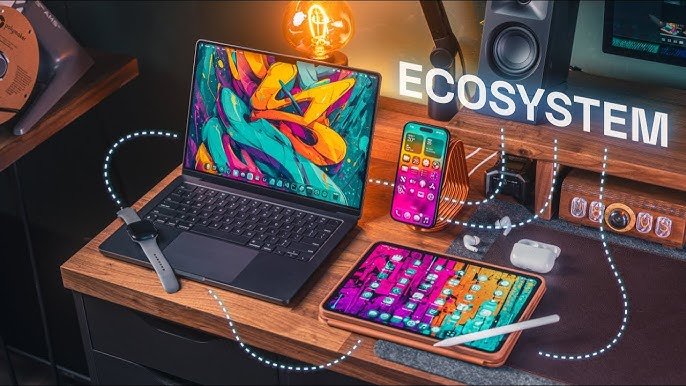
Apple ecosystem desktops are designed to be more than standalone computers. They form part of a connected environment where hardware, software and services work together to create a consistent user experience. For people who already use an iPhone or iPad, a Mac desktop can become the central hub for work, entertainment, communication and creative projects, while maintaining convenient connections with other Apple devices.
The strength of this approach comes from integration rather than simply individual specifications. Features such as iCloud, AirDrop, Handoff and Universal Clipboard can make everyday tasks easier across compatible devices. Understanding Apple ecosystem desktops can help users choose the right Mac, organise their workspace effectively and make better use of the Apple products they already own.
What Are Apple Ecosystem Desktops?
The term Apple ecosystem desktops describes Apple’s desktop computers and the technologies that connect them with the wider Apple ecosystem. Macs use macOS as their operating system and can communicate with compatible Apple devices through various built-in services. This creates an environment where files, information and certain activities can move between devices with relatively little effort.
An Apple desktop does not need an iPhone or iPad to function. However, connecting compatible devices can unlock additional conveniences. An Apple Account, iCloud and Continuity features can help bring different parts of the digital experience together, allowing users to move between devices while maintaining access to important information and familiar applications.
The Main Apple Desktop Computers
Apple’s desktop range serves several different audiences. The iMac provides an all-in-one experience with a built-in display, making it attractive to users who want a clean and straightforward workstation. The Mac mini takes a different approach by offering a compact computer that can be paired with a separate monitor, keyboard and mouse according to the user’s preferences.
The Mac Studio is aimed more towards demanding professional workloads where additional performance can be valuable. Each option has a distinct purpose, so there is no single desktop that suits everyone. Buyers should consider their applications, workspace, performance requirements, storage needs and budget before deciding which Mac best fits their everyday routine.
How Macs Connect With iPhone and iPad
One of the most attractive aspects of Apple’s connected approach is the relationship between a Mac and an iPhone. AirDrop can make transferring supported photographs, documents and other files quick and convenient. Handoff can also allow users to continue supported activities across compatible Apple devices, which can be useful when moving between a desktop and mobile device.
Universal Clipboard provides another practical example of cross-device integration by allowing supported content to be copied on one Apple device and pasted on another. Depending on the configuration, users can also access calls and messages through their Mac. These features reduce the need to repeatedly move information manually between separate devices throughout the day.
The Importance of iCloud
iCloud is an important part of the Apple ecosystem because it can synchronise supported information across compatible devices. Depending on the user’s settings, documents, photographs, contacts, calendars and notes can be made available across multiple Apple products. iCloud Drive can also provide convenient access to supported files without requiring users to transfer them manually.
For Apple ecosystem desktops, this cloud integration can make switching between devices considerably easier. A document started on one device may be available on another, depending on the application and settings involved. Users should still monitor their available storage and protect their Apple Account carefully, particularly when storing important personal or professional information.
Apple Ecosystem Desktops for Work and Productivity
Apple ecosystem desktops can provide a capable environment for office work, studying and remote working. macOS supports a wide range of productivity applications, including Apple’s own Pages, Numbers and Keynote. Users can also access popular third-party tools for communication, project management, collaboration, accounting and other professional requirements, making a Mac suitable for many modern working environments.
A well-designed desktop setup can further improve productivity. An external display, comfortable keyboard, responsive mouse and suitable storage can create an efficient workstation. Apple desktops can also work with cloud-based collaboration platforms and common file formats. However, professionals should check software compatibility before switching platforms, particularly when their workplace depends on specialised Windows applications.
Apple Ecosystem Desktops for Creative Professionals
Creative professionals often have demanding requirements, making desktop performance particularly important. Photographers, designers, video editors and musicians may use Macs for processing large images, editing high-resolution video, creating graphics or producing music. The most suitable computer depends on the applications being used, project sizes and the level of performance required for regular workloads.
The wider ecosystem can also support creative workflows. An iPhone can be used to capture photographs or video that are later transferred to a Mac, while an iPad can complement a desktop for drawing, sketching and note-taking. With suitable displays, storage and accessories, Apple ecosystem desktops can become the centre of a flexible and professional creative workstation.
Apple Services That Complete the Ecosystem
Apple’s ecosystem extends beyond physical hardware. Services such as Apple Music, Apple TV+ and Apple Podcasts can provide access to entertainment across supported devices. Using an Apple Account helps connect compatible services, while cloud-based features can make certain information and content available across the user’s wider collection of Apple products.
This approach can become increasingly convenient as a person adds more compatible devices. A user might begin with a desktop and later add an iPhone or iPad, discovering additional ways for the products to work together. However, users should consider subscription costs and storage requirements because building a broader ecosystem can involve ongoing expenses beyond the initial hardware purchase.
Security, Privacy and Device Management
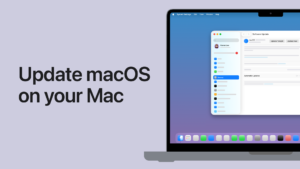
Security is an important part of any desktop computing environment. macOS includes various security technologies designed to protect users and their information, while Apple provides account and device features intended to reduce unauthorised access. Keeping the operating system and applications updated is also important because software updates can include security improvements alongside new functionality.
Connected devices make account security even more important. A single Apple Account may provide access to information and services across several products, so users should use strong authentication and protect their login details. Features such as Find My can also assist with locating compatible devices. Good security habits help users enjoy ecosystem convenience without unnecessarily increasing their exposure to digital risks.
Choosing the Right Apple Desktop
Selecting an Apple desktop should begin with the user’s actual needs rather than simply choosing the most powerful available model. Consider whether the computer will mainly be used for browsing, office work, studying, programming, photography, video editing or other demanding activities. The required memory, storage, processing capability and display setup can vary considerably depending on the workload.
Workspace and budget also matter. An iMac can provide an organised all-in-one setup, while a Mac mini can offer flexibility for users who already own a suitable monitor. A Mac Studio may make more sense for professionals with demanding workloads. Before buying, users should also consider accessories, storage requirements, software compatibility and how long they expect to use the computer.
Advantages and Limitations of Apple Ecosystem Desktops
One of the biggest advantages of Apple ecosystem desktops is their integration with other Apple products. Users who already own an iPhone or iPad can benefit from features that make transferring information and continuing certain tasks more convenient. Apple’s close relationship between hardware and software can also provide a consistent experience across supported devices.
However, the ecosystem is not perfect for everyone. Apple desktops can represent a substantial investment, while some users may prefer the hardware variety and upgrade flexibility available with traditional PCs. Certain specialised applications may also be better suited to Windows. The right decision therefore depends on individual requirements rather than assuming that one platform is automatically superior.
Apple Desktops Compared With Windows PCs
Windows desktops generally offer a broad selection of hardware configurations, manufacturers and upgrade options. Users can choose from numerous components and systems at different price points. Apple’s approach is more controlled, with the company designing its hardware and operating system together. This can provide a streamlined experience, although users may have fewer options for customising or upgrading certain configurations.
The best platform depends on how a person works. Someone heavily invested in Apple devices may find the integration of Apple ecosystem desktops particularly useful. In contrast, users who require Windows-only software, extensive hardware upgrades or specific gaming configurations may prefer a Windows PC. Comparing actual software, hardware and workflow requirements is more valuable than choosing based solely on brand loyalty.
The Future of Apple Ecosystem Desktops
Apple’s desktop strategy is closely connected to developments in Apple Silicon, macOS and cross-device functionality. As processors become increasingly capable and efficient, desktop Macs can continue supporting demanding applications while maintaining strong energy efficiency. Artificial intelligence is also becoming an important part of modern computing, potentially influencing future operating-system features and professional workflows.
Cross-device integration is likely to remain significant as Apple develops its software and services. Future improvements could make communication between Macs, iPhones and iPads even more useful. For users, this could mean smoother transitions between different types of work and entertainment. The desktop computer may increasingly serve as one central part of a broader connected digital environment.
Conclusion: The Future of Connected Mac Computing
Apple ecosystem desktops demonstrate how a computer can become part of a larger technology environment rather than operating as an isolated machine. Through macOS, iCloud and Continuity features, a Mac can connect with compatible Apple devices and services. This can simplify everyday tasks while giving users a consistent experience across their digital devices.
The best choice ultimately depends on individual requirements, workspace and budget. An iMac may suit someone who values simplicity, a Mac mini may appeal to users seeking flexibility, while a Mac Studio can serve demanding professional workloads. For people who value seamless integration, Apple ecosystem desktops can provide a connected and convenient approach to modern desktop computing.
Frequently Asked Questions About Apple Ecosystem Desktops
What are Apple ecosystem desktops?
Apple ecosystem desktops are Mac computers that operate within Apple’s broader ecosystem of hardware, software and services. They can connect with compatible devices such as iPhone and iPad through features including iCloud, AirDrop and other Continuity technologies.
Which desktop Macs are part of the Apple ecosystem?
Apple’s desktop range includes the iMac, Mac mini and Mac Studio. These computers serve different audiences, from everyday home and office users to creative professionals and people with demanding workloads.
How do Apple desktops connect with an iPhone?
Mac desktops can connect with compatible iPhones through features such as AirDrop, Handoff and Universal Clipboard. Depending on the configuration, users can also access supported calls, messages and other connected functions from their Mac.
Can I use an iPad with an Apple desktop?
Yes, an iPad can complement a Mac desktop for activities such as drawing, note-taking, reading, multitasking and creative work. The two devices can also share certain information and services when compatible features are enabled.
Do I need an iPhone to use a Mac desktop?
No. A Mac works independently and can be used without an iPhone. However, people who already own several Apple products can gain additional convenience from Apple’s cross-device features and connected services.
What role does iCloud play in the Apple ecosystem?
iCloud helps synchronise supported information between compatible Apple devices. Depending on settings, users can access documents, photographs, contacts, calendars and notes across their devices, while iCloud Drive provides cloud-based file storage.
Which Apple desktop is best for everyday users?
The best choice depends on personal requirements. Users should consider factors such as display preferences, workspace, performance, storage and budget before selecting an iMac, Mac mini or another desktop Mac.
Are Apple ecosystem desktops worth the money?
They can be worthwhile for users who value performance, convenience and integration with other Apple products. Buyers should compare their software requirements, budget and expected usage before making a purchasing decision.
Can an Apple desktop work with Windows computers?
Yes. Macs can share files and communicate with Windows computers through compatible software, networks, cloud services and common file formats. However, users should check compatibility when relying on specialised software or hardware.
Are Apple ecosystem desktops secure?
Apple desktops include security technologies within macOS, but users should still take sensible precautions. Keeping software updated, protecting the Apple Account and using strong authentication can help safeguard personal and professional information.
Will Apple ecosystem desktops become more advanced in the future?
The continued development of Apple Silicon, macOS, artificial intelligence and connected services could make Apple’s desktop ecosystem increasingly capable. Future improvements may also strengthen how Macs communicate with iPhones, iPads and other compatible devices.