Introduction to Automated Workflow Apps
Businesses today manage a constant stream of emails, customer enquiries, documents, approvals, reports and internal tasks. Handling every activity manually can consume valuable time and increase the possibility of mistakes. Automated workflow apps provide a practical solution by allowing businesses to connect routine processes and make them happen automatically. Instead of repeatedly completing the same actions, employees can create structured workflows that handle predictable tasks with greater speed and consistency.
The value of automation goes beyond simply saving a few minutes each day. When repetitive processes are organised properly, teams can respond faster, communicate more effectively and concentrate on work that requires human judgement. From small businesses to larger organisations, workflow automation can improve operational efficiency across multiple departments. Understanding how these tools work and what features they provide can help businesses choose suitable technology for their specific requirements.
What Are Automated Workflow Apps?
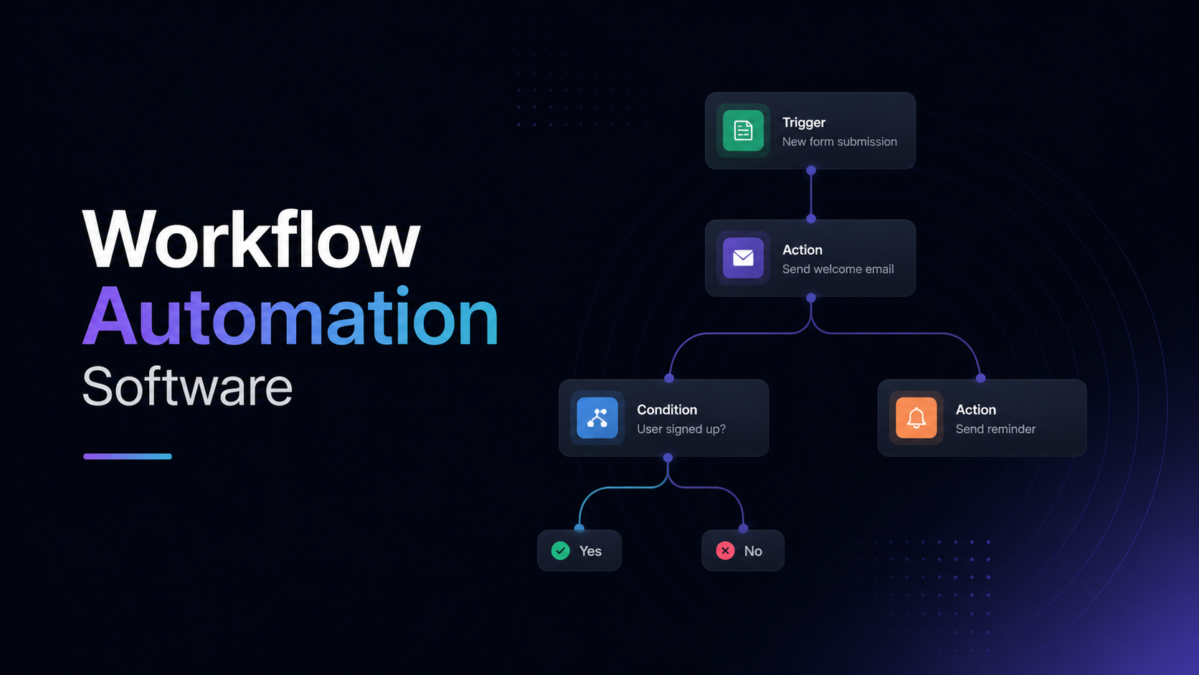
Automated workflow apps are software solutions that help businesses create processes where predefined actions happen automatically. A workflow normally begins with a trigger, such as receiving a new enquiry, submitting a form, creating a customer record or completing a task. The software then follows established rules to perform subsequent actions, such as sending notifications, assigning responsibilities, updating records or requesting approval.
Many modern platforms are designed with visual workflow builders, making automation easier for people without programming experience. Users can select triggers, connect actions and establish conditions through relatively simple interfaces. This approach allows teams to automate repetitive processes without depending entirely on developers. As a result, workflow automation has become increasingly accessible to companies looking to improve productivity without introducing unnecessary technical complexity.
How Automated Workflow Apps Improve Business Productivity
Repetitive administrative work can quietly consume a large portion of the working day. Employees may spend hours transferring information, checking task statuses, sending reminders or updating records across different systems. Automated workflow apps can handle many of these routine activities automatically, allowing employees to spend more time on customer service, strategic planning, creative work and other responsibilities that require human expertise.
Automation can also improve the speed at which teams complete processes. For example, when a customer submits an enquiry, a workflow can immediately notify the appropriate employee and create a follow-up task. This reduces the need for someone to monitor incoming information manually. Faster responses can improve customer experiences while also helping internal teams maintain better organisation and visibility over important activities.
Key Features to Look for in Automated Workflow Apps
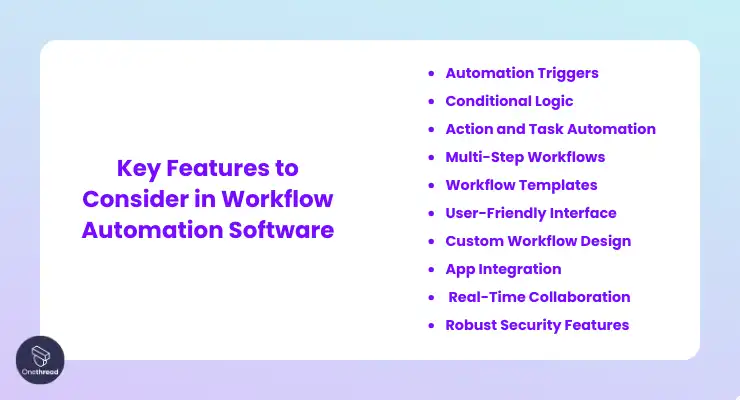
A good workflow automation platform should provide an easy-to-understand workflow builder. Businesses need to create triggers, actions, conditions and schedules without unnecessary complexity. Conditional logic is particularly useful because not every situation requires the same response. A workflow can be configured to perform different actions depending on information received, making automation more flexible and suitable for real-world business processes.
Integrations are another important consideration when comparing workflow platforms. Businesses often rely on separate systems for customer relationships, communication, accounting, marketing, file storage and project management. A useful automation solution should connect these applications where possible. Security, user permissions, reporting, activity monitoring and mobile access can also influence the overall value of a platform, particularly for growing organisations with multiple employees.
Best Automated Workflow Apps for Different Business Needs
There is no universal workflow platform that will be the best choice for every company. A small business may prioritise affordability, simplicity and quick setup, while a larger organisation may need advanced permissions, complex integrations and extensive reporting. The right solution should therefore be selected according to the organisation’s processes rather than simply choosing the most widely recognised platform available.
Different departments can also have completely different automation requirements. Sales teams may need lead follow-ups and customer notifications, while marketing departments could automate campaign activities and content distribution. Finance teams might benefit from approval workflows, whereas human resources departments could automate employee onboarding and leave requests. Identifying these individual requirements makes it easier to select technology that provides genuine operational value.
Automated Workflow Apps for Common Business Tasks
Workflow automation can be useful for a wide variety of everyday business activities. A company could automatically send a confirmation email after receiving a customer enquiry, create a task for a sales representative when a new lead arrives or notify a manager when an invoice requires approval. These simple processes can prevent delays and reduce the possibility of important requests being overlooked.
Employee onboarding provides another strong example of practical automation. When a new member of staff joins an organisation, a workflow could notify the relevant departments, create required tasks, arrange document requests and remind managers about outstanding actions. Similar processes can support customer service, marketing, project management, document approval and expense processing. Automating these predictable activities can create a smoother experience for both employees and customers.
Benefits of Automated Workflow Apps
One of the most noticeable benefits of automation is the amount of time it can save. Employees do not have to repeatedly perform the same administrative actions when software can complete those steps according to predefined rules. Although each automated action may save only a small amount of time, the combined effect can become significant when a process is performed hundreds or thousands of times throughout the year.
Consistency is another important advantage. Manual processes can be affected by forgotten steps, incorrect data entry, delayed responses and communication gaps. A properly configured workflow follows the same instructions whenever its trigger conditions are met. This can improve operational reliability and help businesses maintain consistent standards. Automation can also make processes easier to monitor because managers can see where tasks are being completed and where potential delays are occurring.
Potential Challenges and Limitations
Despite its advantages, automation is not a solution for every business problem. A poorly designed process can become even more complicated when it is automated. Businesses should first understand how an existing workflow operates and identify unnecessary stages before transferring it into software. Automating inefficient processes without reviewing them can result in faster inefficiency rather than genuine improvement.
Costs and technical limitations also need consideration. Some platforms charge according to users, automation runs, features or connected applications. Certain integrations may only be available through premium plans. Data security is another important issue, especially when workflows handle customer, financial or employee information. Organisations should review permissions, authentication, data protection practices and other security measures before introducing automation into sensitive business operations.
How to Choose the Right Automated Workflow App
The selection process should begin with a clear assessment of business requirements. Companies can identify repetitive activities that consume significant time and determine which processes follow predictable rules. Starting with one or two high-impact processes can make it easier to measure the benefits of automation. Businesses should consider whether the platform can support current requirements while remaining flexible enough to accommodate future growth.
Ease of use, integrations, pricing and scalability should all be evaluated before making a decision. A platform may have many impressive features but still be unsuitable if employees find it difficult to operate. Businesses should also check whether the software connects with their existing tools and whether customer support is reliable. Free trials and demonstrations can provide useful opportunities to test workflows before committing to a long-term subscription.
How to Implement Workflow Automation Successfully
Successful automation begins with planning rather than immediately creating workflows. Teams should map the existing process and identify every important step, decision and responsibility. This helps reveal unnecessary actions and potential bottlenecks. Once the process has been simplified, employees can determine which activities should be automated and which decisions should remain under human control.
Businesses should introduce automation gradually and monitor the results closely. Testing a workflow before launching it across an entire organisation can reveal incorrect triggers, missing conditions or unexpected actions. Employees should also understand how the new process works and what they need to do when manual intervention is required. Regular reviews are valuable because business requirements can change, making existing workflows less effective over time.
The Future of Workflow Automation
The next stage of business automation is increasingly connected with artificial intelligence. Traditional workflows usually operate according to predefined instructions, whereas AI-powered systems can analyse information and assist with more complex decisions. This could allow businesses to automate processes that previously required greater human involvement, while still keeping people responsible for important approvals and sensitive decisions.
As businesses adopt more digital services, interconnected automation is likely to become increasingly important. AI assistants, customer relationship systems, communication platforms and workflow tools can work together to create smoother business processes. The future is unlikely to be about removing people from every process. Instead, successful organisations will use automation to remove repetitive work while allowing employees to concentrate on judgement, creativity, relationships and strategic thinking.
Conclusion
Automated workflow apps can transform the way businesses handle repetitive processes by connecting tasks, applications and people through structured digital workflows. They can reduce administrative workloads, improve consistency, accelerate communication and help employees focus on more valuable responsibilities. From sales and marketing to finance and human resources, automation can support a wide range of everyday activities when processes are designed carefully.
Choosing the right platform requires more than comparing feature lists. Businesses should consider their specific workflows, existing software, integration requirements, budget, security needs and future growth. Starting with straightforward, high-value processes can provide measurable results while allowing teams to gain confidence with automation. As technology continues to develop, well-planned workflow automation can become an important foundation for more efficient and adaptable business operations.
Frequently Asked Questions About Automated Workflow Apps
What are automated workflow apps?
Automated workflow apps are digital platforms that allow businesses to create processes where specific actions happen automatically after predefined triggers occur. They can connect different applications, assign tasks, send notifications and update information without requiring employees to complete every repetitive step manually.
These tools are particularly useful for processes that follow predictable rules. Common examples include lead management, employee onboarding, invoice approvals, customer notifications and project updates. By reducing manual intervention, businesses can make routine operations faster, more consistent and easier to monitor.
How do workflow automation tools improve productivity?
Workflow automation tools improve productivity by reducing the amount of repetitive administrative work employees need to complete manually. Instead of copying information between applications or sending routine reminders, employees can allow software to perform these actions automatically according to established rules.
The time saved can then be redirected towards higher-value responsibilities such as customer relationships, planning, problem-solving and creative work. Automation can also reduce delays because tasks and notifications can be triggered immediately when specific conditions are met.
Are automated workflow apps suitable for small businesses?
Yes, small businesses can benefit significantly from workflow automation. Smaller teams often have limited resources, meaning employees may have to manage multiple responsibilities at once. Automating repetitive processes can help these teams save time without requiring additional staff for routine administrative activities.
Many modern platforms also provide no-code or low-code features, making them accessible to users without programming experience. Small businesses can begin with straightforward processes such as enquiry follow-ups, appointment reminders, invoice approvals or customer communications before expanding automation.
Can workflow apps integrate with other business software?
Many workflow platforms can integrate with other applications used by businesses. Depending on the provider, these integrations may include customer relationship management systems, email platforms, communication tools, accounting software, project management services and cloud-storage applications.
Integrations are important because businesses rarely rely on a single application. Connecting different systems allows information to move automatically between them, reducing duplicate data entry and helping teams maintain more accurate records. Companies should check available integrations before choosing a workflow platform.
Are workflow automation tools difficult to use?
The difficulty depends on the platform and the complexity of the workflow being created. Basic automations are often relatively straightforward, particularly when software provides visual builders and pre-built templates. Users can select a trigger and action without writing traditional programming code.
More advanced workflows may require greater planning, especially when they involve multiple conditions, applications and approval stages. Businesses can reduce complexity by starting with simple processes, testing each workflow carefully and gradually introducing more advanced automation as employees become comfortable with the technology.
How much do automated workflow apps cost?
The cost varies considerably between platforms and depends on factors such as the number of users, automation volume, integrations and advanced features. Some services provide free options for basic requirements, while larger organisations may need premium subscriptions with increased limits and administrative controls.
Businesses should look beyond the monthly subscription price when calculating value. Time saved, fewer manual errors, faster customer responses and reduced administrative workloads can all contribute to the return on investment. Comparing these potential benefits with the total software cost provides a more useful assessment.
Are automated workflow apps secure?
Security should be an important consideration whenever a business introduces automation. Workflow systems may process customer information, employee details, financial records or other sensitive data. Organisations should therefore examine authentication options, access permissions, encryption, data handling practices and available security controls before selecting a platform.
Businesses should also ensure that employees only receive access appropriate to their responsibilities. Regularly reviewing permissions and monitoring workflow activity can reduce potential risks. For sensitive processes, organisations should establish clear rules about which decisions can be automated and which require human approval.
How should a business start using workflow automation?
The best starting point is usually a repetitive process that has clear rules and consumes noticeable amounts of employee time. Businesses can document the current process, identify unnecessary steps and determine which actions can be handled automatically. Starting small makes results easier to measure and problems easier to resolve.
Once the first workflow is operating successfully, the organisation can gradually automate additional processes. Monitoring performance, collecting employee feedback and reviewing workflows regularly can help ensure automation continues to deliver value. This gradual approach also makes it easier for employees to adapt to changes in the way work is completed.